YouTube embeds that load on a click.
Paste a YouTube or Vimeo link. You get a placeholder that loads nothing from YouTube or Vimeo until a visitor clicks it, plus the privacy-enhanced embed code, with what each one does and doesn’t avoid.
Copy, paste, done.
Without a link, the code below shows VIDEO_ID where your video goes. Paste a link above and it fills in by itself.
Preview
This preview shows the placeholder only and loads nothing. Without a still of your own it’s a dark panel.
1. Click to load Recommended
Nothing loads from YouTube or Vimeo until a visitor clicks. Paste it where the video goes. With several videos on one page, the script and the style block are needed once.
<!-- Click to load: nothing loads from YouTube until a visitor clicks. -->
<div class="ctl-video">
  <button type="button" class="ctl-video-button" aria-label="Play video: YouTube video. Loads from YouTube (youtube-nocookie.com). YouTube may set cookies." data-ctl-src="https://www.youtube-nocookie.com/embed/VIDEO_ID?autoplay=1" data-ctl-title="YouTube video">
    <span class="ctl-video-title">YouTube video</span>
    <span class="ctl-video-play" aria-hidden="true"></span>
    <span class="ctl-video-note">Loads from YouTube (youtube-nocookie.com). YouTube may set cookies.</span>
  </button>
</div>

<!-- Once per page. With a strict Content-Security-Policy, move this script into your own JS file. -->
<script>
  document.querySelectorAll(".ctl-video-button").forEach(function (button) {
    if (button.dataset.ctlReady) return;
    button.dataset.ctlReady = "1";
    button.addEventListener("click", function () {
      var frame = document.createElement("iframe");
      frame.src = button.dataset.ctlSrc;
      frame.title = button.dataset.ctlTitle;
      frame.allow = "autoplay; encrypted-media; picture-in-picture; fullscreen";
      frame.allowFullscreen = true;
      frame.referrerPolicy = "strict-origin-when-cross-origin";
      frame.className = "ctl-video-frame";
      button.replaceWith(frame);
      frame.focus();
    });
  });
</script>

<!-- Once per page. Change the colours to match your site. -->
<style>
  .ctl-video { aspect-ratio: 16 / 9; max-width: 100%; }
  .ctl-video-button, .ctl-video-frame { display: block; width: 100%; height: 100%; border: 0; border-radius: 12px; }
  .ctl-video-button { position: relative; overflow: hidden; padding: 0; background: #16130f; color: #fff; font: inherit; text-align: left; cursor: pointer; }
  .ctl-video-button img { position: absolute; inset: 0; width: 100%; height: 100%; object-fit: cover; }
  .ctl-video-title, .ctl-video-note { position: absolute; left: 0; right: 0; padding: 10px 14px; background: rgba(0, 0, 0, 0.72); }
  .ctl-video-title { top: 0; font-weight: 700; }
  .ctl-video-note { bottom: 0; font-size: 0.85em; }
  .ctl-video-play { position: absolute; left: 50%; top: 50%; width: 72px; height: 72px; margin: -36px 0 0 -36px; border-radius: 50%; background: rgba(0, 0, 0, 0.75); }
  .ctl-video-play::after { content: ""; position: absolute; left: 28px; top: 21px; border-style: solid; border-width: 15px 0 15px 24px; border-color: transparent transparent transparent #fff; }
  .ctl-video-button:hover .ctl-video-play, .ctl-video-button:focus-visible .ctl-video-play { background: #c4302b; }
  .ctl-video-button:focus-visible { outline: 3px solid #ffbf47; outline-offset: 3px; }
</style>
2. The plain embed, in privacy-enhanced mode (youtube-nocookie.com)
The player loads with the page, so the visitor’s IP address still reaches YouTube or Vimeo before anyone presses play. Use it only on a page that already asks for consent first.
<iframe src="https://www.youtube-nocookie.com/embed/VIDEO_ID" title="YouTube video" width="560" height="315" style="width: 100%; height: auto; aspect-ratio: 16 / 9; border: 0;" allow="encrypted-media; picture-in-picture; fullscreen" referrerpolicy="strict-origin-when-cross-origin" allowfullscreen loading="lazy"></iframe>What each option avoids
Privacy-enhanced mode and dnt=1 change what YouTube and Vimeo do with a view. They don’t stop the player from loading with the page. Only waiting for a click does that.
| Standard embed | youtube-nocookie.com or dnt=1 | Click to load | |
|---|---|---|---|
| Contacts YouTube or Vimeo when the page loads | Yes | Yes | No, only after a click |
| Visitor’s IP address and your page address reach them before a choice | Yes | Yes | No |
| Can store data on the device before anyone presses play | Yes | Google doesn’t say the player stores nothing. Vimeo says some essential cookies stay. | No, nothing has loaded |
| What they do with a view | Their usual terms | YouTube: not used to personalise browsing or ads. Vimeo: no session data or analytics. | After the click, the same as the column before |
| Extra code on your page | None | None | A short script, included |
From YouTube’s and Vimeo’s own help pages, as summed up in our guide Embed videos that wait for a click.
A button first, the player after
A normal YouTube embed is an iframe that loads with the page. Before anyone presses play, the visitor’s browser fetches the player from Google, and every request carries their IP address and the address of your page. The ePrivacy rule asks for consent before storing or reading anything on a device that isn’t strictly necessary, and a video nobody has pressed play on is hard to call something the visitor asked for.
The code from this tool puts a button in the iframe’s place. It shows the video’s title, a play button and one line that names the company the video comes from. Nothing on it loads from YouTube or Vimeo. When someone clicks, a few lines of script swap the button for the player, loaded from youtube-nocookie.com or from Vimeo with dnt=1, with autoplay on so one click usually starts the video.
The still image is up to you. Leave it out and the button is a dark panel with the title. Or save a frame, or YouTube’s own still, and put it on your own site: the placeholder then loads it from your domain, and Google doesn’t see the visit. This tool doesn’t fetch thumbnails for you, so nothing passes through our servers either. The link you paste stays in your browser.
The code is yours to keep: plain HTML, a short script and a style block, with no link to gatelamp.com and nothing that tracks. It sets the referrer policy YouTube asks for, strict-origin-when-cross-origin, because YouTube blocks playback without a referrer. The placeholder is a real button, so it works with a keyboard and a screen reader, and focus moves into the player after the click.
Whether a click on a placeholder counts as consent for what the player does next is a legal question, and this page is general information, not legal advice. What a placeholder does settle is that nothing loads from another company before a visitor asks.
Live on the maker’s own site
frankspin.com, the personal site of Gatelamp’s maker, loads its YouTube videos this way since 19 October 2026. Before a click, its video posts make no requests to YouTube or Google. Gatelamp’s click to load will do the same for YouTube, Vimeo and Google Maps, in your site’s own style.
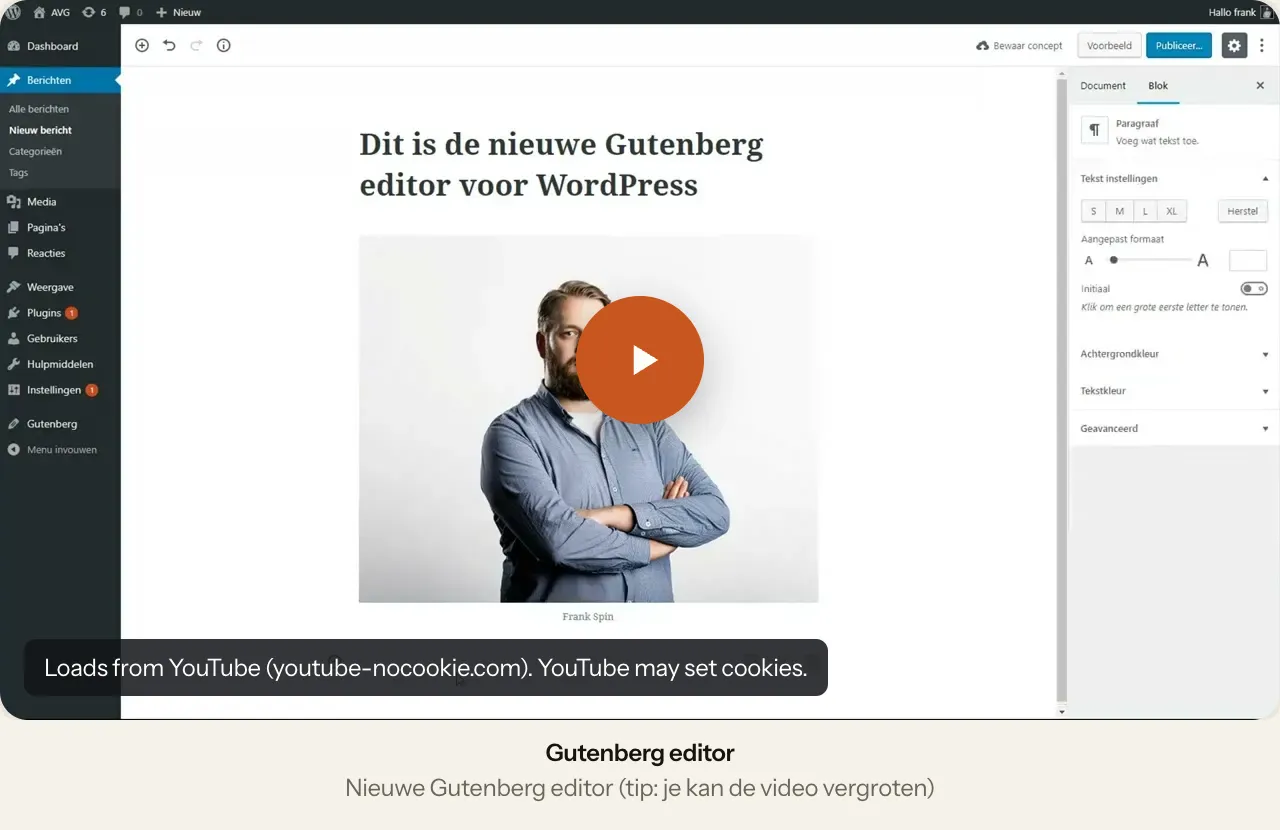 frankspin.com: the Gutenberg post →A screen recording behind a play button, with one line that says it loads from youtube-nocookie.com.
Video embeds: common questions
- Does youtube-nocookie.com mean no cookies?
- Not on its own. Google says a view in privacy-enhanced mode isn’t used to personalise browsing or ads, and its help page doesn’t say the player stores nothing. The player still loads from Google as the page opens, so the visitor’s IP address and your page address reach Google before anyone chooses.
- What does dnt=1 do on Vimeo?
- According to Vimeo’s help page, the player then stops collecting session data and analytics, while some essential cookies stay. The player still loads with the page, so this tool uses dnt=1 together with click to load.
- Do I still need a cookie banner with click to load?
- Maybe not for the video. Before the click nothing loads from YouTube or Vimeo, so the page itself stays free of them. Other tools on your site can still need consent; the cookie banner checker on this site shows what a page loads.
- Can I use my own thumbnail?
- Yes, and it’s the better choice. Put an image on your own site and enter its address. The placeholder then loads it from your domain, so Google doesn’t see the page view. Without an image, the placeholder shows the title on a dark panel.
- Does the code load anything from Gatelamp?
- No. It’s plain HTML, a short script and a style block. It doesn’t link to gatelamp.com and contains no tracking.
General information about the rules, not legal advice. A link that doesn’t work? Tell us.
Read and use next
Where Gatelamp helps
Switch on early.
Join the waitlist for Gatelamp. We invite people in small groups, and waitlist members get the early price.
The form didn’t load. You can also join on our waitlist page.